Icon of program: Lispr

Lispr for Windows

  • Free
  • 4.8
    1
  • V0.2.16
Free Download for Windows

View an ad to download for free

Speech-to-text and translator tool

Lispr is a free utility app developed by Codebridge Technology Inc. It’s a speech-to-text tool that helps users turn spoken words into typed text in seconds. In addition, it can also perform real-time translations to other languages on the spot. It boasts a light digital footprint and works with virtually any application. 

From dictations to typed words 

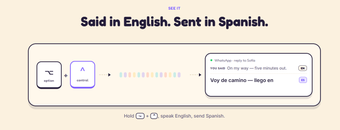
Getting started with Lispr is pretty easy since you only need a microphone to start dictation on what you want typed and/or translated. Hold the Ctrl key to start talking, with the option to press the Shift key mid-speech to also translate it to another language. It recognizes nearly 100 languages for speech and over 30 for translation duties, and it works with any app you have running.  

You can also copy clipboard text to do the same thing, and you can even build a custom vocabulary, which is handy for special terms, brands, and such. Now, as handy as it is, it does lack a couple of important features, specifically context-aware word case application or proper grammar checks. As of this writing, it’s still in Early Access, so these could be included in future updates. 

Quite impressive 

Overall, Lispr is a great tool you can check out if you want to merge voice dictation and speech-to-text function into a single, handy companion for work and general productivity. It’s easy to set up, intuitive to use, and offers a nice selection of languages to pick from for your translation needs. Despite its active development status, it’s already a solid experience. Try it out now. 

  • Pros

    • Easy to set up and use
    • Supports a wide range of languages
    • Build a custom vocabulary
  • Cons

    • Still in Early Access
    • Lacks advanced grammar and editing tools
 0/2

App specs

  • License

    Free

  • Version

    0.2.16

  • Latest update

  • Platform

    Windows

    Other platforms (1)
  • OS

    Windows 10

  • Language

    English

    Available languages

    • English
    • Spanish
    • German
    • French
    • Italian
    • Russian
    • Portuguese
    • Dutch
    • Polish
    • Chinese
    • Turkish
    • Arabic
    • Czech
    • Korean
    • Greek
    • Hindi
    • Japanese
    • Danish
    • Finnish
    • Norwegian
    • Swedish
  • Size

    14.30 MB

  • Developer

Also available in other platforms

Program available in other languages


Icon of program: Lispr

Lispr for PC

  • Free
  • 4.8
    1
  • V0.2.16
Free Download for PC

View an ad to download for free


User reviews about Lispr

Have you tried Lispr? Be the first to leave your opinion!

Add review

Latest articles

Laws concerning the use of this software vary from country to country. We do not encourage or condone the use of this program if it is in violation of these laws.
Softonic

Is Lispr safe?

100/100

Score result: Clean

This file passed a comprehensive security scan using VirusTotal technology. It is safe to download.

  • Virus free
  • Spyware free
  • Malware free
  • Verified by Security Partners

    VirusTotal logo

Scan Info

Last scan
Thursday, July 16, 2026
Scan provider
VirusTotal · Full report

File Integrity

File
Lispr-win-Setup.exe
SHA256
a11a7754e72dd59c7afe2bbfa942f2e81a6fb4f090dc986348d0d3796b8b4e35
SHA1
e7e08de2d97656eb4425e7ef09a57b6a30f195cc

Softonic security commitment

Lispr has been thoroughly scanned by our advanced security systems and verified by industry-leading partners. This file comes from the official developer and has passed all our security checks, showing no signs of viruses, malware, or spyware. For more information, visit our Security and Trust Center